
To fix a traffic drop in Bangladesh, first confirm the drop in Google Search Console (GSC) by comparing the last 28 days with the previous period and checking if it is sitewide or page-level. Next, check manual actions, security issues, indexing, and key technical problems like speed, mobile usability, robots/noindex, canonicals, redirects, and 404/5xx errors.

Then match the timing with possible Google algorithm updates, refresh stale content to improve E-E-A-T, and build high-quality local backlinks. Finally, track recovery weekly in GA4 and GSC, so you can see what works and how to fix traffic drop safely.
Key Takeaways
- First, confirm the drop in GSC and GA4 before you change anything.
- Next, decide if the drop is sitewide or page-level, then follow the right checklist.
- Then check manual actions, security issues, and indexing early.
- After that, fix robots/noindex, canonicals, redirects, and 404/5xx before rewriting content.
- Finally, refresh key pages for intent match and Bangladesh relevance, and track progress weekly.
First Step: Verify the Traffic Drop in GSC & GA4
To fix a traffic drop, start with proof in Google Search Console and GA4. First, compare GSC performance dates to see if the drop is sitewide or page-level. Next, check manual actions, security issues, and page indexing, because these can reduce visibility fast.
Now confirm the data.
- Open GSC → Performance and set Compare (last 28 days vs previous 28 days).
- Note changes in clicks, impressions, CTR, and average position.
- Then open GA4 → Reports → Acquisition → Traffic acquisition and compare the same dates.
If GA4 drops but GSC stays stable, tracking issues may explain the “drop,” not SEO. Finally, write a quick note in your change log with the date and what changed. This step helps you find the real cause faster and avoid risky guesswork.
Scope Check: Is the Drop Sitewide or Page-Level?
Scope changes your next move, so confirm it early in Google Search Console. First, open Pages and sort by clicks difference. If many page groups drop together (home, service, category, blog, product), treat it as a sitewide issue. If only a few pages drop, treat it as a page-level issue.
Next, segment the data so you can spot patterns faster:
- Country: Bangladesh
- Device: mobile vs desktop
- Search type: web vs image
- Queries: brand vs non-brand
Then read the shape of the drop. A sudden “cliff” often points to an outage, robots/noindex, template changes, or tracking problems. A slower decline over weeks often points to content decay, SERP changes, or an algorithm shift. Finally, separate traffic drop vs conversion drop—if clicks stay steady but leads fall, check forms, calls, WhatsApp clicks, and UX first.
Traffic Drop After a Google Update? Check This

If many pages drop around the same date, check whether a Google update happened around that time. Next, match the date with what changed on your site, like a theme or plugin update, a redesign, a migration, or big content edits.
Then follow this safe workflow:
- Confirm the drop date in GSC
- Check whether many queries lost their average position at once
- Pause risky moves for now, like mass URL changes, large deletions, or heavy pruning
- Focus on clean signals first: technical health, intent match, and content quality
Finally, look at the current SERP. If Google now ranks more videos, lists, or local results, adjust your page structure to match intent before you rewrite everything.
Google Not Indexing Pages? Check GSC Manual Actions
First, go to GSC → Security & Manual Actions. If you see a manual action, fix the exact issue, then submit a reconsideration request. If you see security problems like hacked pages or malware, clean the site first and close the entry point.
Next, open GSC → Page indexing and look for sudden spikes in:
- Blocked by robots.txt
- Excluded by noindex
- Duplicate or wrong canonical
- Crawled – currently not indexed
- Soft 404
Then spot-check 5–10 important URLs in URL Inspection. If Google cannot fetch, render, or index a page, content updates will not help yet. Finally, monitor for hacked spam pages, since these can reduce trust quickly on any site, including Bangladesh-based sites.
Technical SEO Checklist: Robots, Indexing, Speed
Technical blockers can cause the fastest traffic drops, especially after site updates. So go through this checklist in order, and log the date of every change. If you need help with a full technical SEO audit, you can also review our SEO services in Bangladesh.
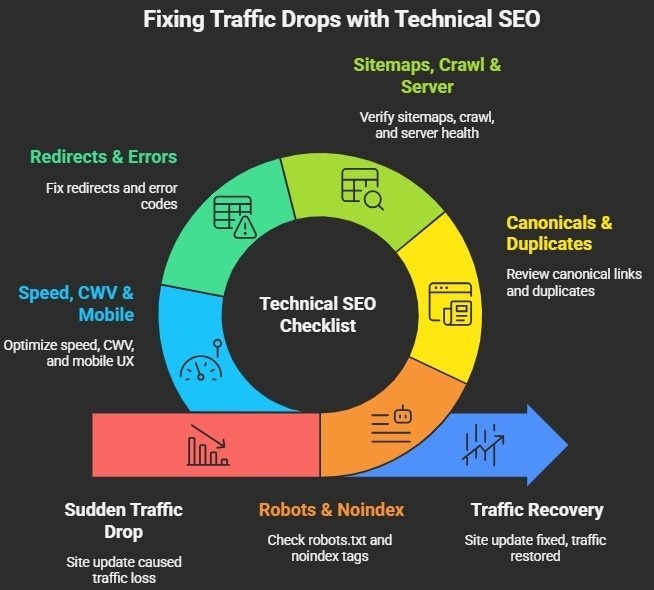
Robots and noindex
- Check robots.txt for new blocks on important pages or folders.
- Check meta robots tags for accidental noindex on templates (service, category, blog).
- Re-test key URLs in GSC → URL Inspection after fixes.
Canonicals and duplicate URLs
- Confirm each key page uses the correct canonical URL.
- Fix canonicals that point to unrelated pages.
- Reduce duplicates from parameters, filters, faceted navigation, and pagination.
Sitemaps, crawl, and server health
- Check XML sitemap status in GSC and resubmit after fixes.
- Review Crawl stats for sudden crawl spikes or drops.
- Check hosting uptime and slow TTFB, since both can reduce crawling.
Redirects and error codes
- Audit 301/302 redirects after redesigns or migrations.
- Remove redirect chains and loops.
- Fix spikes in 404/410 and 5xx errors on top landing pages.
Speed, Core Web Vitals, and mobile UX (Bangladesh-first)
- Test top landing pages in PageSpeed Insights.
- Improve Core Web Vitals (LCP, INP, CLS) step by step.
- Fix mobile usability issues like “tap targets too close” and “content wider than screen.”
Refresh Content to Recover Traffic in Bangladesh
After you fix technical blockers, focus on content recovery. This step helps you regain clicks by matching what people in Bangladesh actually want to read, and it also supports your plan for how to fix traffic drop without wasting weeks.
Update stale content with local relevance
- First, pick the top losing pages from GSC.
- Next, update outdated sections, add clearer examples, and include a few relevant FAQs.
- Then add the Bangladesh context only when it fits (cities, pricing, service area, local terms).
Improve E-E-A-T and trust signals on-page
- Add a clear author bio and indicate who reviewed the content.
- Add real contact options people use (phone, WhatsApp, email form).
- Add business details if you serve locally.
Also, show real proof with case studies to build trust.
Remove low-quality pages the right way
- Merge overlapping pages into one stronger page.
- Use 301 redirects for removed URLs.
- Update internal links to point to the final page.
Verify search intent before rewriting
- If top results look like lists, add lists.
- If they lead with short answers, add a direct answer near the top.
- If results look local, add local proof and location coverage.
Lost Backlinks? Check Competitors and SERP Changes

If rankings drop and you do not see a major technical issue, backlinks and competitor changes may explain the loss. So start by checking whether your site lost strong links or gained spam links.
Backlink checks
- First, review links in GSC, or use Ahrefs/Semrush if you have access.
- Next, check if you lost links pointing to your most important pages.
- Then watch for a sudden spike in spammy links.
- Use disavow only when spam targets your site, and you cannot remove it, and log what you found.
Competitor checks
- Next, list the competitors ranking above you for your lost queries.
- Then compare page format (guide vs service vs list), depth (sections, FAQs, tables), and trust signals (author info, sources, business proof).
SERP shifts and CTR drops
- Finally, if impressions stay steady but clicks fall, your CTR likely dropped.
- So improve titles and meta descriptions for clarity and intent match, then track CTR weekly in GSC.
Traffic Drop Recovery Plan: 30 Min, 24 Hr, 7 Days
This plan helps you move fast while keeping changes safe and trackable.
First 30 Minutes
- First, confirm the drop in GSC and GA4 with the same date range.
- Next, decide if it is sitewide or page-level.
- Then check manual actions and security issues.
- Next, decide if it is sitewide or page-level
First 24 Hours
- Next, review the Page indexing excluded reasons in GSC.
- Then audit robots/noindex, canonicals, redirects, and 404/5xx.
- After that, spot-check key URLs with URL Inspection.
- Finally, list the top losing pages and queries, so you know what to fix first.
First 7 Days
- Then fix technical blockers and confirm improvement in GSC.
- Next, refresh the top pages for intent match and Bangladesh relevance.
- Finally, strengthen internal links and monitor results weekly.
Traffic Drop Fix Checklist (Table + Checklist)
If you want to know how to fix traffic drop without guessing, use this table to match the symptom with the most likely cause, then confirm it in the right tool.

| Symptom | Likely Cause | Where to Confirm | Fix |
| Clicks down + impressions down | ranking loss or indexing loss | GSC Performance + Page indexing | fix blockers first, then refresh key pages |
| Impressions steady + clicks down | CTR drop or SERP feature shift | GSC CTR + SERP check | update title/meta, add direct answers |
| A few pages drop | decay, cannibalization, page issue | GSC Pages + Queries | refresh, consolidate, fix canonicals |
| GA4 down, but GSC steady | tracking or consent issue | GA4 + GTM checks | fix tags, filters, consent setup |
| Many URLs excluded | robots/noindex/duplicate | Page indexing + URL Inspection | remove blocks, correct canonicals, resubmit sitemap |
One-page recovery checklist
High priority
- Save GSC Compare (baseline vs current)
- Check GA4 vs GSC mismatch and check manual actions + security issues
- Review indexing spikes and excluded reasons
- Verify robots.txt and noindex
Medium priority
- Review canonicals and duplicates
- Audit redirects
- Check 404/5xx errors and check mobile usability
- Check the sitemap and resubmit if needed
Low priority
- Refresh top losing pages (intent match + local relevance)
- Update internal links to key pages
- Review competitors and SERP changes
SEO Recovery Timeline: What to Track Each Week
Track weekly, not hourly, because weekly data shows the real trend. First, review performance in GSC, then confirm business impact in GA4.
- Weekly in GSC: clicks, impressions, CTR, average position, and the top losing pages/queries (use the Bangladesh filter when needed).
- Weekly in GA4: organic sessions, key landing pages, and conversions like forms, calls, and WhatsApp clicks.
Finally, set realistic expectations. Technical fixes can improve indexing within days, while content and authority changes often take a few weeks to show steady recovery.
How to Report a Traffic Drop (Client Update Template)
Keep updates short, calm, and based on proof. First, share a quick snapshot of what changed, then share what you will do next.
5-minute reporting pack
- GSC Compare screenshot
- Top 5 losing pages and top 5 losing non-brand queries
- Indexing note (if any)
- Next 3 actions with dates
Short update template
- “Organic clicks dropped X% from [date] to [date].”
- “It looks [sitewide/page-level], and GSC shows [signal].”
- “Next, we will fix [technical/content], then track weekly.”
Frequently Asked Questions
Why did my website traffic drop suddenly?
Sudden drops often come from tracking breaks, robots blocks, noindex tags, redirects, outages, server errors, or major site edits. Start with GSC Compare, then check manual actions and indexing, then run technical triage.
How do I know if a Google update caused my traffic drop?
Check if many queries lost position around the same date in GSC. Next, confirm indexing health and robots/noindex status, since simple technical blocks can look like an update hit.
What if GA4 shows a drop but Search Console looks normal?
That pattern often points to tracking integrity issues. Check the GA4 property and data stream, then review the GTM tags, filters, and consent settings, and compare dates again.
How long does it take to recover after a traffic drop?
Technical fixes can show early indexing improvements in days. Content refresh and authority changes often need weeks, so track weekly trends.
What should I fix first to recover lost organic traffic?
Fix blockers first: robots.txt, noindex, canonicals, redirects, 404/5xx, sitemap, and mobile usability issues. Then refresh the pages that lost clicks and strengthen internal links.
Next Steps After a Traffic Drop
You can recover from most traffic drops when you follow the proof and a clear order. First, confirm the drop in GSC and GA4. Next, check the scope and root cause, then fix technical blockers. After that, refresh content for intent match and Bangladesh relevance, and monitor results weekly. If you suspect a Google update, follow Google’s core updates guidance
If you want a checklist-first plan on how to fix traffic drop for a Bangladesh website, Branding Dask can help with an SEO audit and a clear recovery action plan.

Business Growth Expert with 7+ years of experience driving scalable growth through full stack digital marketing, including SEO, SEM, paid ads, AI automation, and content led strategies.