
Creating a topical map in Bangladesh means structuring your website content to cover one niche fully, so Google sees your site as a trusted source (topical authority). Many sites publish often, yet Google still finds the topic unclear because pages do not connect.

A topical map solves this by grouping related topics into pillar pages and cluster pages. In this guide from Branding Dask, you will learn how to create a topical map by choosing one niche, expanding subtopics with Google PAA and local queries, grouping by search intent, planning internal links, and publishing in priority order. Then you update the map every 2–3 months using trends and Google Search Console.
Key Takeaways
- A topical map creates a clear topic hierarchy for Google and readers.
- First, choose one central entity so your niche stays focused.
- Next, group pages into clusters to make planning and publishing easier.
- Then label search intent to reduce overlap and protect rankings.
- Also, add key entities so Google understands the meaning across your content.
- Finally, use internal links to connect clusters, and review the map every 2–3 months to keep it current.
What Is a Topical Map? Simple SEO Definition
A topical map is a structured plan that lists the pages you need to cover one main topic and its related subtopics. It also shows each page’s role and how pages connect through internal links.
In most cases, you build it with:
- Pillar page: the broad overview for the parent topic
- Cluster page: a focused article for one subtopic
- Supporting article: microtopics, FAQs, and narrow questions
Since topical maps follow semantic SEO and entity-first SEO, Google can understand the meaning behind your content better. As a result, it can connect related pages through entities and relationships, similar to a simple Knowledge Graph view. If you want to apply this structure to service content, you can connect your pillar and cluster pages to your SEO services in Bangladesh page.
Topical Authority: Why Google Trusts Your Site
Topical authority means your site covers a topic well, both in depth and in range. So, you answer related questions, keep your pages consistent, and connect them with strong internal linking.
Google tends to rank pages that match search intent and help users finish a real task. Because of that, when you cover People Also Ask questions and related searches, you often gain visibility across more keywords. In Bangladesh, this matters even more. People use city names, service-area terms, and mixed Bangla/English searches, so topical authority can build trust and bring more leads for local services.
How to Create a Topical Map: Step-by-Step
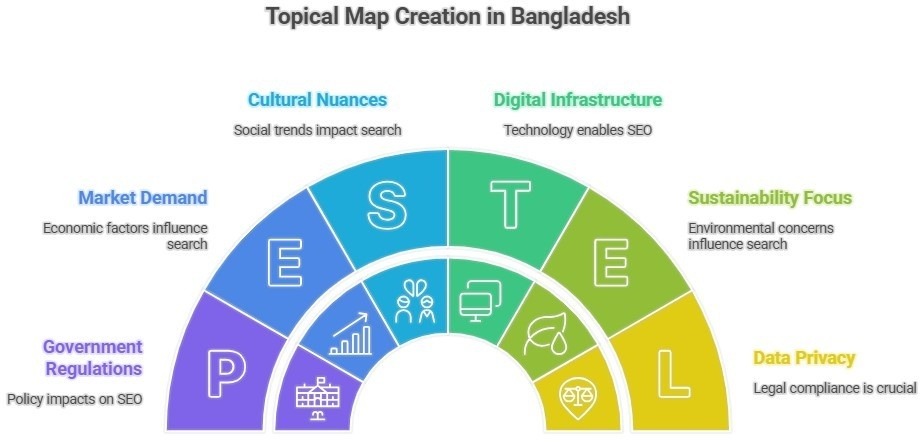
Step 1 — Define your central entity (main topic)
First, choose one broad topic that fits your niche and audience. For example: Digital Marketing in BD, Real Estate in Dhaka, Bangladeshi Tourism, or Home Gardening. Then write one clear goal, such as: “Get leads for SEO services across Bangladesh.”
Step 2 — Find Subtopics With Keyword Research
Next, break the main topic into subtopics, microtopics, and real questions. Use Google Autocomplete, People Also Ask, and Search Console (if you have data). If you need demand and competitor clues, you can also check Keyword Planner and an SEO tool.
After that, add the Bangladesh local intent:
- Bangla/English mixed terms
- city or area modifiers (Dhaka, Chattogram, Sylhet)
- “near me” and service variants
Examples: “best hotels in Sylhet,” “Dhaka to Cox’s Bazar train,” “skin care clinic in Dhanmondi.”
Step 3 — Group Subtopics Into Clear Content Clusters
Now organize your list into topic clusters. Keep core sections for must-cover topics, and keep supporting sections for helpful extras.
Example (Home Gardening):
- Core: vegetable gardening, indoor plants
- Supporting: pest control, garden tools
Step 4 — Set Pillar vs Cluster Pages and Plan URLs
Then decide page roles:
- Pillar page: broad overview of the parent topic
- Cluster page: one focused subtopic
- Supporting article: narrow microtopics and FAQs
Also, keep your URL structure clean, like:
- /seo/
- /seo/topical-map/
- /seo/internal-linking/
Step 5 — Create a Visual Topical Map (simple is fine)
After you set the hierarchy, turn it into a visual map. You can use a mind map tool, or you can simply use Google Sheets/Excel. Place the core topic in the center, then branch out into pillars, clusters, and supporting articles.
Step 6 — Match Each Page to Search Intent
Now label every planned page with one intent:
- Informational (what/how/guide)
- Commercial (best/tools/templates)
- Transactional (service/pricing/hire)
- Navigational (brand/tool names)
For example, “best smartphone” fits informational intent, while “Samsung phones in BD” fits transactional intent. This step reduces overlap and improves relevance.
Step 7 — Add Entities and Ontology Notes (Quick Checklist)
Next, add a short “Entity notes” field for each page:
- Primary entities: topical map, topical authority, semantic SEO
- Supporting entities: topic cluster, content hub, pillar page, cluster page
- Relationships: entity relationship, Knowledge Graph
- SERP signals: People Also Ask, related searches
- Local context: Bangladesh + city modifiers
Step 8 — Review and Update Every 2–3 Months
Finally, treat your topical map as a living document. Every 2–3 months, update it using:
- Google Trends (new topics and seasonality)
- Search Console (new queries and weak pages)
- competitor gaps (missing subtopics)
- new services and location modifiers
Internal Linking Plan for SEO in Bangladesh
Internal linking turns your topical map into a system that both readers and Google can follow. So, use a simple structure you can repeat on every new page.

Core rules
- Link the pillar page to every cluster page
- Then link each cluster page back to its pillar
- Also, link related clusters when it helps the reader
- Keep anchor text clear and topic-based
- Add links while you write, not weeks later
Suggested link ranges
- Pillar page: 15–40 internal links (based on cluster count)
- Cluster page: 5–12 internal links (pillar + related clusters + one relevant service page)
Anchor ideas (use only when relevant)
- topical authority
- keyword clustering
- internal linking
- content brief template
- SEO services in Bangladesh
As a result, your content hub becomes easier to crawl, and your pages can support AI Overview and zero-click visibility through stronger internal connections.
Topical Map Publishing Plan: 30–60–90 Days
A topical map works only when you publish in a clear order. So, use this simple 30–60–90 day plan to build topical authority without feeling overwhelmed.
Days 1–30
- Publish 1 pillar page
- Publish 4–6 cluster pages
- Then add internal links across all published pages
Days 31–60
- Publish 6–10 supporting articles
- Update older pages with links to new pages
- Next, refine headings using Google Search Console queries
Days 61–90
- Fill the topical gaps you missed
- Add commercial pages (templates, tools, comparisons)
- Finally, refresh pages that stay on page two
Track these KPIs
- Impressions and clicks by cluster
- Average position for key queries
- Indexing checks for new URLs
- Lead actions (forms, calls, messages)
Topical Map Template (Bangladesh Example + Checklist)
To make your topical map easy to build and easy to follow, start with a simple Sheets/Excel table. Then add one Bangladesh-focused example and a quick checklist you can reuse.

Topical Map Table (Google Sheets/Excel)
| Main Topic | Page Type | Page Title / Cluster Topic | Search Intent | Focus Keyword | Suggested URL | Primary Entity | Related Entities | Internal Links To | Priority | Status |
| SEO | Pillar Page | SEO Hub (Main Guide) | Informational | SEO guide | /seo/ | SEO | content hub, topic cluster | all cluster pages | 15 | Planned |
| SEO | Cluster Page | How to Create a Topical Map | Informational | how to create a topical map | /seo/topical-map/ | topical map | topic hierarchy, entities | /seo/ + related clusters | 13 | Planned |
| SEO | Cluster Page | Internal Linking Plan | Informational | How to create a topical map | /seo/internal-linking/ | internal linking | anchors, cluster page | /seo/ + topical map | 14 | Planned |
| SEO | Cluster Page | Topical Authority Basics | Informational | topical authority SEO | /seo/topical-authority/ | topical authority | semantic SEO, Knowledge Graph | /seo/ + topical map | 13 | Planned |
Example Topical Map for Bangladesh (Digital Marketing in BD)
Now, if you run a digital marketing agency in Bangladesh, you can map your content like this:
- Pillar: Digital Marketing in BD
- Informational clusters: SEO basics, topical map, keyword clustering, internal linking, content planning
- Commercial clusters: SEO audit checklist, content calendar template, best SEO tools
- Transactional clusters: SEO services in Bangladesh, PPC management, social media marketing services
- Location notes: Dhaka, Chattogram, Sylhet, Khulna, Rajshahi, Barishal, Rangpur, Mymensingh
If you want to see real examples, check our SEO case studies in Bangladesh.
Topical Map Checklist Before You Publish
- I picked a central entity and set scope boundaries
- I collected subtopics from PAA and Autocomplete
- I grouped topics into clusters and a hierarchy
- I assigned pillar vs cluster page roles
- I labeled intent for every planned page
- I added entity notes for each cluster
- I planned internal links (pillar ↔ clusters)
- I set a 2–3 month review date
Simple Tools to Build Your Topical Map

If you want quick support, use:
- Research: Google Trends, AnswerThePublic, Wikipedia table of contents
- Planning: Google Sheets/Excel or Miro
Frequently Asked Questions
What is a topical map in SEO?
A topical map is a structured plan of pages that covers one topic fully. It lists pillar pages, cluster pages, supporting articles, and the internal links that connect them.
What is topical authority, and why does it matter?
Topical authority means your site covers a topic deeply with connected content. It matters since Google can match your site to more related searches and SERP features.
Topical map vs topic cluster—what is the difference?
A topic cluster is one pillar page and its connected cluster pages. A topical map is the full plan that includes many clusters, intent labels, entities, priorities, and publishing order.
How many cluster pages should one pillar page have?
Start with 6–12 cluster pages under one pillar page. Then add more as you find new subtopics, while keeping overlap low.
How do I create a topical map without paid tools?
Use Google Autocomplete, People Also Ask, related searches, and Google Trends. Then plan in Google Sheets, label intent, map internal links, and publish by priority.
Next Steps: Topical Map for Bangladesh
A topical map turns scattered posts into a clear content hub, so Google can understand your main topic and readers can find answers faster. Now, if you want to scale rankings in Bangladesh, start with one focused pillar page and 6–12 cluster pages, then follow your internal linking rules and 30–60–90 day plan. Track progress using the Google Search Console Performance report.
If you want help, Branding Dask can support your Bangladesh-focused plan and show you how to create a topical map with the right page structure, intent labels, and internal links, so your team can publish with more clarity.

Business Growth Expert with 7+ years of experience driving scalable growth through full stack digital marketing, including SEO, SEM, paid ads, AI automation, and content led strategies.