
An SEO audit is a step-by-step check of your website’s technical SEO, on-page SEO, content, internal links, and backlinks, so you can find what stops your site from ranking on Google. If you want to know how to do an SEO audit in a simple, safe order, Branding Dask recommends starting with Google Search Console to review index coverage and crawl errors.

Next, check Core Web Vitals and mobile speed, then audit titles, headings, duplicate content, internal links, and backlinks in that order. Finally, create a fix-first priority plan and an SEO audit report; a small website audit often takes 2–6 hours.
Key Takeaways
- First, start your SEO audit in Google Search Console, then confirm improvements after fixes.
- Next, fix indexing and crawl issues, then improve Core Web Vitals for mobile users.
- Then polish on-page SEO (titles, headings, intent match) and update weak content.
- After that, strengthen internal links so that important pages are easier to find.
- Finally, use an Impact vs Effort plan to decide what to fix first.
Start Here: 10-Minute SEO Audit Quick Checklist
Start here if you want quick signals before a full audit. First, you will spot the biggest blockers. Then, you will know what to fix first.
10-minute quick checklist
- Open Google Search Console → Pages, then note the top “Not indexed” reasons.
- Next, open Experience → Core Web Vitals, then list any “Poor” URL groups.
- After that, open Performance, then compare the last 28 days with the previous 28 days.
- Then check 3 key pages for title tag, H1, and meta description.
- Finally, test one key page in PageSpeed Insights (mobile).
If you want expert help after this quick check, explore our SEO services in Bangladesh.
What Is an SEO Audit? Simple Definition
An SEO audit is a structured website check that shows what blocks your pages from ranking on Google. First, it reviews technical SEO like crawlability, indexability, redirects, canonical tags, and Core Web Vitals.
Next, it checks on-page SEO, content quality, internal links, and your backlink profile. Then, you turn the findings into a simple fix plan.
Short definition box
- An SEO audit checks what stops your site from ranking and what to fix first.
- It covers crawlability, indexing, speed, content quality, and links.
Why SEO Audits Matter: Key Benefits
An SEO audit helps you spot ranking blockers early, so you fix the right things first. It also gives you a clear action list instead of guesswork.

Benefit 1: Fix Indexing & Crawl Issues Fast
Indexing issues stop your pages from showing on Google. So, start with Google Search Console checks like index coverage, crawl errors, URL Inspection, and soft 404 signals.
In Bangladesh, WordPress sites often face wrong noindex settings, duplicate URLs, and messy parameters. Because of that, these fixes can bring quick gains.
Benefit 2: Improve Mobile Speed (Core Web Vitals)
Most users browse on mobile, so speed matters. Core Web Vitals checks help you reduce slow loading, delayed taps, and layout shifts.
Next, improve results with smaller images, fewer heavy scripts, better caching, and faster hosting. Want proof that these fixes work? See our SEO case studies.
SEO Audit Tools You Need, Mostly Free
You can run a solid SEO audit with mostly free tools. First, make sure you have access, then start with the core set.
Core tools
- Google Search Console (Pages, Performance, Core Web Vitals, URL Inspection)
- Google Analytics (organic trends, landing pages, conversions)
- PageSpeed Insights (mobile speed + Core Web Vitals)
- A crawler like Screaming Frog (broken links, redirects, duplicate pages)
Optional tools
- A backlink tool for referring domains and anchor text checks
- A keyword gap tool to compare competitors and find missing keywords
SEO Audit Step-by-Step Order for Beginners
This step-by-step order helps you fix the biggest SEO blockers first. First, you will confirm technical health and indexing. Next, you will improve speed for mobile users. Then, you will polish on-page SEO and content, and finally, you will add Bangladesh local checks and a simple action plan.
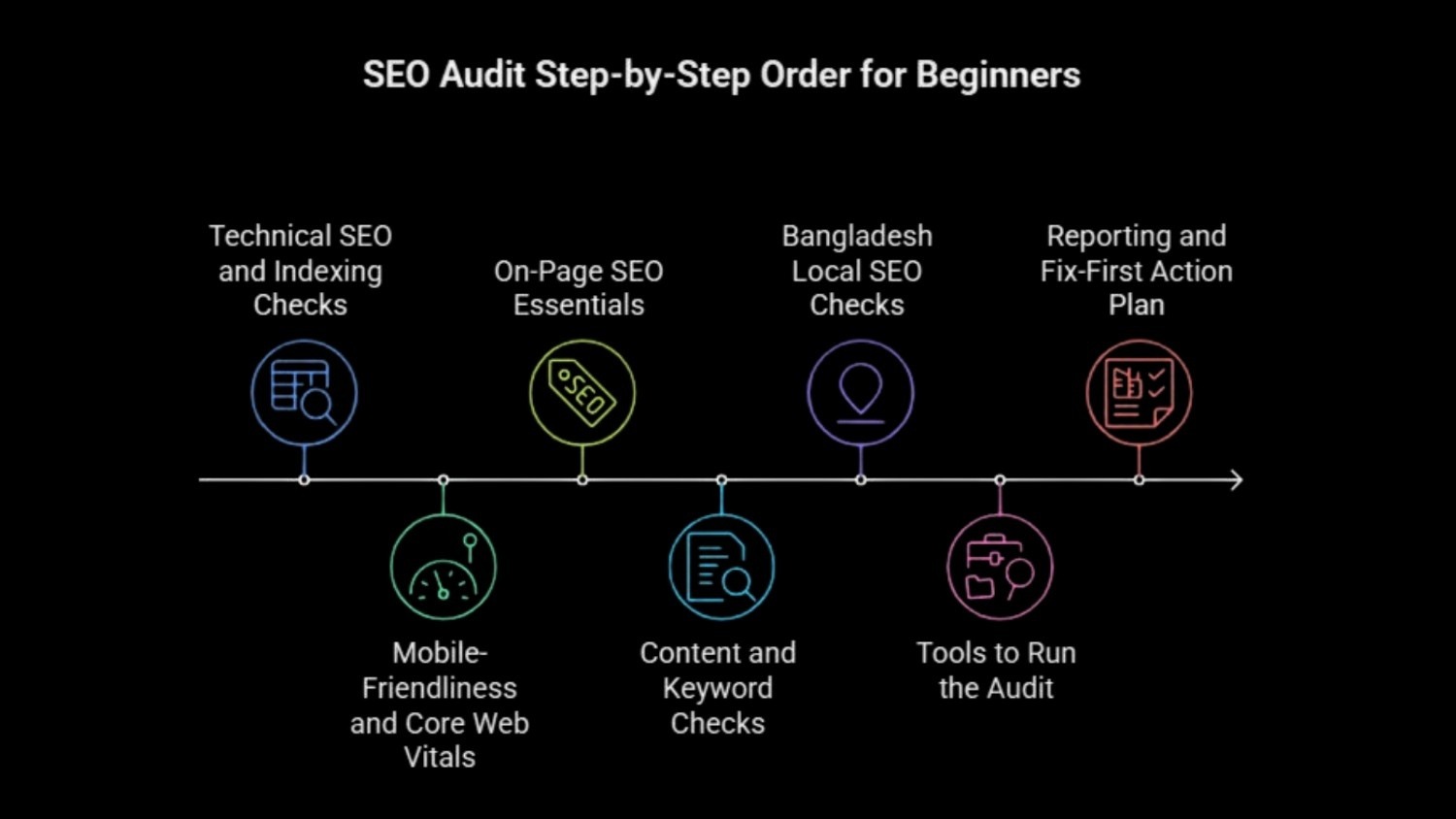
Step 1 — Technical SEO and Indexing Checks
First, open Google Search Console → Pages and list the top Not indexed reasons. Next, use URL Inspection on your most important pages to confirm indexing signals and the selected canonical.
- Check indexation and crawling issues (coverage reasons + crawl errors)
- Review robots.txt and meta robots (index/noindex)
- Confirm XML sitemap submission and fix sitemap errors
- Fix redirect chains/loops and use 301 where needed
- Review canonical tags and remove conflicts
- Clean duplicate versions (HTTP/HTTPS, WWW/non-WWW) and messy URL parameters
- Confirm HTTPS security (valid SSL and secure site version)
If you want to know how to do an SEO audit properly, start here, because indexing and crawl issues block everything else.
Step 2 — Mobile-Friendliness and Core Web Vitals
Next, confirm your site works well on mobile, since Google uses mobile-first indexing. Then check Core Web Vitals in Search Console and test key pages in PageSpeed Insights (mobile).
- Verify the site is responsive and usable on mobile
- Improve page speed and aim for fast loading (often under ~3 seconds)
- Focus on Core Web Vitals:
- LCP: compress images and reduce heavy scripts
- INP: reduce JavaScript bloat and long tasks
- CLS: set image sizes and stabilise layouts
Step 3 — On-Page SEO Essentials
Then review what users see in search results and on your pages. Start with titles and headings, since they affect clicks and relevance.
- Titles: keep them clear and usually under ~55 characters
- Meta descriptions: keep them useful and usually under ~155 characters
- Use one H1, then keep a clean H2/H3 structure
- Improve internal linking so users can reach key pages fast
- Add descriptive image alt text where it helps
Step 4 — Content and Keyword Checks (English + Bangla if needed)
Next, check content quality and keyword targeting. In Bangladesh, many sites rank with English keywords, yet Bangla keywords can help based on your audience.
- Improve content relevance and usefulness
- Check for thin pages and overlap, then refresh or merge pages
- Target the right keywords, including local intent terms when relevant
- Keep keyword placement natural in headings and body text
Step 5 — Bangladesh Local SEO Checks
- If you want more calls and local leads in Bangladesh, add a quick local check after the main audit.
- First, confirm your Google Business Profile details and NAP consistency.
- Next, review local keywords and citations.
- Then use the full Bangladesh Local SEO Audit Checklist section below to complete the local steps.
Step 6 — Tools to Run the Audit
Use the tools listed in the SEO Audit Tools You Need section above to complete each check. Then save your key findings so you can add them to your audit report.
Step 7 — Reporting and Fix-First Action Plan
Finally, turn findings into action. First, fix technical problems, then speed, then on-page and content.
- Prioritise fixes by impact vs effort
- Create a short report with issues, fixes, and how to confirm results
- Re-audit every few months so performance stays stable
Fix Indexing and Traffic Drops in Search Console
Need quick answers? First, follow the right flow, then confirm the result in Google Search Console.
If pages are not indexing
- Check GSC → Pages and note the exact “Not indexed” reason.
- Next, review robots.txt and meta robots (noindex) settings.
- Then use URL Inspection to confirm canonical or indexing signals.
- Finally, fix the issue, request indexing, and recheck the status.
If traffic dropped
- Compare periods in GSC → Performance (last 28 days vs previous 28).
- Next, check if the drop hits a few pages or the whole site.
- Finally, review recent changes and check Core Web Vitals.
SEO Audit Fix Order Based on Impact and Effort
First, fix what blocks Google from indexing your pages. Next, improve speed. Then polish the on-page and content.

| Fix Area | What to Fix First | Priority |
| Indexing | noindex mistakes, wrong canonicals, blocked pages | Highest |
| Crawl errors | broken links, soft 404s, bad redirects | High |
| Core Web Vitals | slow mobile LCP/INP, layout shifts | High |
| On-page + Content | weak titles/H1, thin pages, overlap | Next |
Bangladesh Local SEO Audit Checklist for Businesses
If you want more calls and local leads in Bangladesh, add these checks after your main SEO audit. First, fix the basics, then strengthen your local signals.
Local SEO checklist
- Update your Google Business Profile (category, services, hours)
- Keep NAP consistent across your site and listings
- Build a few trusted local citations
- Target your service area (Dhaka, Chattogram, Sylhet, or your city)
- Ask for reviews and reply regularly
For example, a Dhaka service business can get more leads after it fixes NAP mismatches and improves mobile speed on the contact page.
SEO Audit Checklist and One-Page Report Template
If you want to know how to do an SEO audit the same way every time, use this quick checklist first. Then, record results in a simple report so you can confirm fixes in Google Search Console.
Quick SEO audit checklist
- Indexing + Crawl: Pages report, URL Inspection, robots/noindex, sitemap, 404s, redirects, canonicals
- Speed: Core Web Vitals, mobile usability, caching basics
- On-page + Content: titles, H1/H2, intent match, thin/duplicate pages, cannibalization
- Links: internal links (orphan pages) and backlink risks
One-page SEO audit report template
| Section | Finding | Fix | Confirm in Search Console |
| Indexing | “Crawled – currently not indexed” | improve internal links, update content | The Pages report shows more indexed URLs |
| Crawl errors | 404 URLs | redirect or update internal links | Fewer errors appear over time |
| Speed | Poor mobile CWV | compress images, cut scripts | CWV groups improve over time |
| On-page | Duplicate titles | rewrite titles and metas | CTR improves in Performance |
Frequently Asked Questions
How often should I do an SEO audit?
Run a light SEO audit each month and a full website SEO audit every quarter. Run a technical SEO audit after theme, plugin, or redirect changes.
Can I do an SEO audit for free with Google Search Console?
Yes. Search Console covers index coverage, crawl errors, performance, and Core Web Vitals. A crawler helps you spot broken links and redirect chains.
What should I fix first after an SEO audit?
Fix indexing and crawlability first. Next, improve Core Web Vitals. Then fix on-page SEO and content quality. After that, review internal links and backlink risk.
How long does an SEO audit take for a small website?
A small site audit often takes 2–6 hours, based on page count and issue level. You can still get value in the first hour with Search Console and PageSpeed checks.
Do I need an agency to do an SEO audit in Bangladesh?
You can run a beginner SEO audit with Google tools. A digital marketing agency can help when you need technical fixes, faster prioritisation, or a clear SEO audit report for your team.
Next Steps After Your SEO Audit
Now you know how to do an SEO audit in a clear, safe order. First, check index coverage and crawl issues in Google Search Console. Next, improve Core Web Vitals for mobile users. Then polish on-page SEO and update weak content, and after that, review internal links and backlink risks.
If you want a quick next step, run the 10-minute quick SEO audit today. If you prefer a fix-first plan and a simple one-page SEO audit report, Branding Dask can help you turn the findings into action.

Business Growth Expert with 7+ years of experience driving scalable growth through full stack digital marketing, including SEO, SEM, paid ads, AI automation, and content led strategies.